08 Jul 2026
Sheboygan is em-powered!
You may contact me at mailto:Charles Rhode<CharlesCurtisRhode@GMail.com>?subject=MeshMenu. I don’t mean to say that I speak for Sheboygan or even just the Sheboygan Meshtastic Community. We’re looking for our voice. Until we find it, I’ll try to point you toward answers to your questions.
Meshtastic is:
Open firmware loaded in a long-range (LoRa) radio
The small, inexpensive, battery-operated radios that can be flashed with such
The open communication standard that the firmware implements
The circuit design that embodies the standard
A peer-to-peer network of a handful of nearby radios and by extension a Mesh of many more distant radios
A cellphone App that controls each radio via Bluetooth, or
A command-line PC interface (CLI) that controls a radio through a USB port
A Python application-programming interface (API) module on which the CLI is built
The local acquaintances who tinker with the radios and by extension the larger communities of hobbyists (to world-wide scale) who are experimenting with this technology
It’s a lot to cover. There are several concepts that cluster around the central notion of a (local) network of devices that relay short text messages from one to another without a central server. However, there is precious little folklore on the open Web about how to become involved with Mesh radios.
Apparently the folklore exists mainly on mainstream Szociál Media services (i.e., the closed Web: Reddit, Meta, X, Discord, YouTube, et al.) which I abjure, and the more formal documentation on the open Web is diffuse and presumes foundational knowledge that novices do not necessarily possess. This document is written to consolidate links from the open Web into a novice’s perspective.
Meshtastic is one of a handful of radio technologies for use by ordinary citizens and businesses. For example, everyone carries one or two radios in his pocket nowadays. (We call these cellphones, and owners are by far the largest sector of private-radio Users. Of course cellphone technology requires an infrastructure of cellphone towers that are owned by commercial cellphone-service providers.)
Ham radio, citizens band (CB) radio, and walkie-talkies are other examples that do not rely on service providers. These are more or less long-range (a few miles to intercontinental distances) and require considerable electrical power to operate.
These technologies represent a social contract between the User and his nation. His government reserves the use of radio technology because its capacity is inherently limited. Simultaneously, the nations of the world recognize the utility of instantaneous two-way long-distance communication for their economies. Each government allocates part of the radio spectrum to public use to prevent overuse and with the stipulation that it is not used to organize crime and insurrection.
Ham radio was a part of the picture from the inception of radio communications. The term refers to inexperienced, ham-fisted telegraph operators who made up the amateur ranks. In the United States Hams have been licensed since 1912. Today, they pass tiered FCC examinations, provide their identity and location, and receive a unique call-sign. The deal is that all transmissions are in the clear without any encryption and that they will police one another’s transmissions to prevent misuse of the short-wave spectra.
Meshtastic runs on extremely low-power LoRa radios. Unlike ham radio, it is unlicensed. Unlike other publicly accessible radio technologies, a modicum of encryption is built-in so that private traffic can be directed to single radios or to shared channels.
Meshtastic is a solution in search of a problem. (Here is a consolidated list of links from the Meshtastic subreddit detailing problems for which Meshtastic is proposed as a solution.) If you were to poll Meshtastic Users about their motivations, they would volunteer a range of threat scenarios — a curious mixture of doomsday fascination and obsession with various political-conspiracy theories — that would put off anyone who might wish to become part of such a movement. No, we don’t really want to go there, but for completeness I am bound to mention this stuff, anyway, because it illuminates the personalities of the people you will encounter.
Since it is headless (and at low power unlicensed), Meshtastic can be controlled only by authority at the local level, which would of necessity require local authority to participate in or jam all such communication. State and national authorities have no leverage beyond their domination of local authority. This leads many — whom I shall term Anarchists — to promote Meshtastic as anti-authoritarian — to propose its obvious use for organizing general opposition to state and national police action.
Because it is battery-operated and low-power, Meshtastic can survive natural and man-made disasters if enough people participate. LoRa radios can even be solar powered. This leads the Preppers and Survivalists among us — whom I shall term Vigilantes — to promote Meshtastic for use in catastrophic situations — presumably in support of local emergency-services authorities. It is not for nothing that hobbyists on the bleeding edge of Meshtastic experimentation are predominately ham-radio enthusiasts.
Brief, low-bandwidth messaging will still be possible even when conventional two-way communications (such as land-line and cellular telephones and eMail) and broadcast media (such as radio and TV stations and the Internet) are all off the air. Thus Meshtastic might be able to make up for critical fragility in our national infrastructure.
There’s a conundrum here. It’s seductive to think of applying the Meshtastic solution in extraordinary circumstances, but that won’t work while Users keep their radios locked away and allow batteries to drain when not in use. The problems that Meshtastic is supposed to solve are not everyday ones, but, if you want Meshtastic networks to work in extreme situations, it behooves you to find reasons to use them in ordinary situations, too: (1) to be sure they’re working, (2) to assure yourself that you remember how to work them, (3) continually to contribute local bandwidth, and (4) to support your network of like-minded neighbors.
Therein lies the rub — lack of everyday commitment to maintaining the Mesh — and I don’t have the answer for this. Perhaps making the Meshtastic hardware (and know-how) more generally available will somehow conjure an ordinary appetite for it and enable its widespread adoption, resulting in improved infrastructure redundancy — not to say burgeoning ideologies of independence. That’s what I hope for.
The Web site that is the principal source of information in this document is:
Note: This site is hosted by Vercel, a US-based cloud-application service. It is not friendly toward foreign VPNs and anonymizing networks such as TOR. Vigilantes approve; Anarchists do not. If Vercel refuses to serve content to your browser, you need to change exit nodes. Just ask TOR to select a new circuit. Sit back and let TOR hammer on on Vercel’s front door from a series of TOR exit nodes until it finds one that Vercel hasn’t blocked.
LoRa is radio technology. Thus the spectrum it uses lies to the south of visible light, infrared, and microwave. Radio frequencies are below 1GHz. In the U.S., Meshtastic uses a frequency band centered on 915MHz with wavelength of about 32.5cm. This is the same frequency band already in use by Internet of Things (IoT) devices including backyard weather stations and Sheboygan Water Utility remote-read meters. LoRa radios magically are able to avoid interference from competing devices without creating unexpected interference for them.
At this point I would like to explain how LoRa transmissions are refracted (bent) by the atmosphere, but this is a fraught topic. The degree of bending makes the horizon look nearer or father away. According to Wikipedia:
[T]he amount of atmospheric refraction is a function of the temperature gradient, temperature, pressure, and humidity.
… and I might add “frequency,” so good luck modeling that or even explaining any actual results! Suffice it to say that LoRa transmissions are bent by their passage though the atmosphere and may (on a good day) appear to emanate from locations beyond the geographic horizon. Here in Sheboygan, WI, we regularly “see” Meshtastic radios from Muskegon, MI; Benton Harbor, MI; Valparaiso, IN; Chicago, IL; and Milwaukee, WI, which are over the horizon from us (albeit in directions without a lot of ground clutter). How is this possible? One explanation is that (on a good day) their transmissions are bent so that our horizon looks farther away from us than it really is. This is not “skip” in the short-wave sense of radio signals bouncing off the ionosphere, but it is a similar effect. This skip appears to persist for several hours at a time, although it is anyone’s guess how stable transmissions are during that time or whether our transmissions are likewise “seen” in those places.
At the time we see these places, we see a lot of radios near them. This is “hop.” In the Meshtastic world, each radio that receives a message may rebroadcast it to increase the range of the message. When we see a transmission from a well positioned radio, it may have originated from a less well positioned radio nearby. We can thus see a number of radios at the same time in the same vicinity even though we receive transmissions directly from only one of them.
It is normal for the number of visible radios to fluctuate wildly from less than one dozen to several dozen depending on atmospheric conditions, but it is also possible to bridge Meshtastic transmissions across the Internet between very distant radios. Because we rarely see radios with credible locations from outside the Midwest, it’s doubtful that bridging (if it occurs as described) is common.
See the Wikipedia article, “LoRa,” about long-range radio technology.
LoRa uses license-free sub-gigahertz radio frequency bands EU433 (LPD433) or EU868 (863–870/873 MHz) in Europe, AU915/AS923-1 (915–928 MHz) in South America, US915 (902–928 MHz) in North America, IN865 (865–867 MHz) in India, and AS923 (915–928 MHz) in Asia.
The frequency band is chosen by the firmware loaded into the radio. You have to purchase radios flashed for your locale, or you have to flash them before use.
Long-range is a misnomer. In practice — in electronically noisy environments such as small-town neighborhoods — small portable LoRa pocket radios with 1/4 wave stub antennas can see one another and communicate over only a few city blocks, and success is greatly affected by the siting of both radios. 1/2 wave whip antennas are slightly more efficient. Higher off the ground is better. Locations must be clear of obstructions such as dense foliage and metal siding and screening. Heavy fog frustrates all communication attempts.
Long-range communications are achieved by relaying messages from one radio to another. Maximum hops is a radio-configuration parameter. It is generally set to three. Messages die out before they reach the limits of the known universe. This is so that the Mesh doesn’t just fill up with entropy. In other words, the universe has a center, and you are it, but the universe has no edges that you can see. Tuning the performance of the local Mesh in high-traffic situations (by fooling with the maximum-hop count among other things) is a cooperative venture among all local Mesh Users. It is best to stick with the configuration settings recommended by your local group.
LoRa radios can have various interfaces.
Antenna
Port for rechargeable battery
Solar panel
USB-C port
GPS
Bluetooth
Display
Keyboard
WiFi
Power and reset buttons
LoRa radios can be based on a couple of different micro-controller units (MCUs) with differing power requirements. Of course, the number of interfaces that require power and their duty cycles affect battery life, as well.
When you order a radio, you generally will have at least a couple of antenna options from low to high-gain.
You will wish to be sure your radio kit includes a battery, but a solar panel is optional. Naturally you’ll need a weather-proof housing to site the radio outdoors.
Most (all?) radios include a USB-C port for charging. Plan to use a slow USB-A wall adapter along with a USB A-to-C power cable. It is not certain that all MCUs can throttle the charging current to prevent the battery’s overheating.
GPS circuitry is optional on most (all?) radios. If your use-case includes tracking in rough-hiking or materials-transportation situations, then you’ll need to spend extra for this.
Even the simplest (cheapest) radios have Bluetooth, so you can do without with the display and keyboard and use your cellphone to control the radio instead. Alternatively you can control the radio (and charge the battery) from a USB port on your PC. Bluetooth and USB control seem to be mutually exclusive. You can switch back and forth, but you can’t use both at the same time.
Most (all?) radios do not include WiFi. Instead they rely on cellphone and PC Apps to provide access to the Internet as a bridge between local Meshes that are out of range of one another. What crosses the Internet is message-queue telemetry transport (MQTT) packets. These are generally carried on the server operated by the Meshtastic Project. Many Mesh User Groups on the other hand deprecate MQTT. They feel that it masks issues with low Mesh bandwidth, potentially generates Mesh saturation, and increases dependency on the Internet, which the Mesh is designed to avoid.
Here is a handy checklist of radio circuit boards and peripherals. I don’t know how current any of this is. Do play with the all the checkboxes, but do not be overwhelmed by the variety of radios seemingly available. This guy has done a lot of research, but you probably won’t. Many of these configurations will be obsolete, out of stock, or otherwise out of reach by the time you are ready to place an order for equipment.
North Dakota Mesh (NoDak) has an attractive hardware page, too.
Here are recent counts of Mesh radio hardware encountered:
 03 HELTEC_MESH_NODE_T114
 01 HELTEC_MESH_POCKET
 15 HELTEC_V3
 06 HELTEC_V4
 04 LILYGO_TBEAM_S3_CORE
 01 NRF52_PROMICRO_DIY
 01 PORTDUINO
 16 RAK4631
 03 SEEED_SOLAR_NODE
 01 SEEED_XIAO_S3
 09 STATION_G2
 02 TBEAM
 01 THINKNODE_M3
 05 TRACKER_T1000_E
 05 T_DECK
 01 T_DECK_PRO
 02 T_ECHO
 01 UNSET
 02 WISMESH_TAG
---
 79
I use the Heltec T114 radio from Muzi Works in the H2T case for about $64. These cases are not mass-produced; they are 3D printed, which gives you a notion of the rather small size of the market. They are not moisture resistant.
The Heltec T114 has two buttons curiously named “RST” and “User.” RST stands for reset, and User is On/Off among other things. In the H2T case, the “User” button is larger with greater relief. Here is a link to the button functions supported by the Meshtastic firmware.
Install the Meshtastic App from one of these two verified sources:
The cellphone App is the most common interface to your radio for flashing firmware, setting up your initial configuration, and maintaining it. It talks to the radio from the cellphone via Bluetooth or through the USB ports. While running, the App unloads messages from the radio into cellphone memory, keeping the limited radio memory clear for incoming traffic.
You can achieve the same things with the PC CLI, which uses either Bluetooth or the USB ports:
Also, there appears to be a Web-based version that is able to do this from a cellphone or a PC.
This document does not explore these alternatives. Instead, it describes flashing firmware and radio configuration using only the cellphone App.
It should come as no surprise that there are several hobbyist schemes for using LoRa radios. Meshtastic is just one. MeshCore is another, but see the critique of Meshtastic, MeshCore, and Reticulum by Jonah Aragon. At this writing, Meshtastic appears to have a leg up over MeshCore in terms of the size of the installed User base — at least in the United States, but this really does depend on your locale. Some cities in the United States are using MeshCore instead of Meshtastic, so you need to check around.
This document describes Meshtastic exclusively because it is prevalent in Sheboygan, WI.
Flashing firmware into the radio is ultimately the same process however it is done, but there are different approaches that I can think of:
Cellphone App with USB C-to-C cable
Cellphone App with Bluetooth
PC CLI with USB-C cable
PC CLI with Bluetooth
Web Client on Cellphone with USB C-to-C cable
Web Client on Cellphone with Bluetooth
Web Client on PC with USB-C cable
Web Client on PC with Bluetooth
We can trim this down. First, I would strike all the Bluetooth methods. They’re slow. Bluetooth requires that you “sync” with the radio, and this requires that you have some kind of firmware already running there, so it raises the chicken vs egg dilemma. Presumably the radio looks like a memory device to whatever platform is connected with a USB-C cable regardless of whether the firmware is running or not. (I could be wrong!)
Also, I’d strike the Web Client approaches. Who knows what evil JavaScript must conjure to gain control of the communications?
Now, not everyone will have access to a PC, so I must assume they’re all going to be flashing firmware with the cellphone App via a USB C-to-C cable. See how easy that was?
These step-by-step instructions are subject to change as the Meshtastic cellphone App and the Meshtastic firmware develop. “Presumptions” are made explicit. If your experience is at odds with these presumptions, you have strayed from the path. I find it extremely gratifying to check off completed steps.
Charge the radio’s battery.
Poke the RST button on the radio and wait for it to reboot.
Connect the radio and the cellphone with a USB C-to-C cable. Presumably you’ll see a pop-up message on the cellphone from the Meshtastic App’s volunteering to take control of the radio. How the display of this message is achieved is indeterminate. I just think of it as a bit of black magic. If the Meshtastic cellphone App does not start automatically, start it manually.
There is a row of icons across the bottom of each of the cellphone App’s main screens:
Conversations

Nodes

Mesh Map

Settings

Connection

Poke the “Connection” icon.
Presumably you’ll have no connections to begin with. If you do, disconnect any connections that you have.
There is a row of three buttons across the middle of the “Connection” screen:
Bluetooth
WiFi Network
Serial
Poke the “Serial” icon.
Presumably you’ll see one USB device. Select it.
Poke the “Settings” icon at the bottom of the screen.
There are seven groups of options:
Radio configuration
Device configuration
Module configuration
Backup & Restore
Administration
Advanced
App
Do not heedlessly change any of these settings. Do not hesitate to change any of these settings when directed to do so. Get the difference?
Scroll to the “Backup & Restore” group and expand the “Export configuration” option. Select “Save.” This proposes a filename of the form:
Meshtastic_ffff_yyyymmdd_nodeConfig.cfg
… which will be written into the “Downloads” folder in User-accessible RAM on your cellphone. Select “Save” again.
On the “Settings” page, scroll to the “Advanced” group and expand the “Firmware Update” option.
This displays the firmware’s revision-level release info including an itemized list of more or less significant changes from the previous version, which I’m sure you’re just dying to learn.
Presumably the cellphone App correctly identifies your radio hardware and displays the revision-level of the firmware already installed on it (if any).
There are three buttons across the top of the “Firmware Update” screen:
Stable
Alpha
Local File
Select the “Stable” button. This proposes a new level of firmware to be flashed into your radio. If the proposed version matches the installed version, we are done here.
However, it doesn’t hurt to re-install the same level of firmware that is already installed, if that’s what you want to do.
Presumably there is an “Update via USB File Transfer” button in the middle of the “Firmware Update” screen. Poke it, and select “I know what I’m doing.”
The Meshtastic App will fire up the default “File Picker” App on your cellphone, whatever that is. Presumably the “File Picker” App will show you a directory in the radio’s memory. Presumably the “File Picker” App will ask you whether this is the correct folder. Poke the “USE THIS FOLDER” button, and presumably the “File Picker” App will ask you for permission to write into the radio’s memory. Select “Allow.”
Presumably the radio is sitting at its Device Firmware Upgrade (DFU) screen.
Do not exit the “File Picker” App. Instead switch back to the Meshtastic App. Check that you have followed the directions there and select “OK.”
Return to the “File Picker” App to be sure it is underway, writing to the radio’s memory, and give it a swift kick if it is not
Presumably the “File Picker” App will close almost instantly. Presumably the Meshtastic App will be able to verify that the correct firmware has been flashed into the radio. Presumably the radio will reboot, taking a little longer, and presumably the Meshtastic App finally will volunteer to take control of the radio as before, which you may approve.
Presumably the Meshtastic App will wind up on its “Connection” screen.
Disconnect any connections that you have.
Poke the “Serial” icon.
Presumably you’ll see one USB device. Select it.
Presumably this completes the process of flashing the firmware.
What follows is not a step-by-step process like flashing the radio’s firmware; nevertheless, it builds on the same “Settings” menus used there, and the same caveats apply against making heedless changes. The directions in this section — such as they are — rely on controlling the radio from the Meshtastic cellphone App. Here, the kind of connection between the cellphone and the radio (Bluetooth or USB C-to-C cable) is optional. Because you are more likely to monitor the radio untethered by the USB C-to-C cable, this section begins with instructions on how to sync your radio to your cellphone via Bluetooth.
What follows is a list of recommended best options for several of the radio “Settings,” which may (or may not) impact the tuning of the local Mesh. Many of these settings are derived from instructions of local Meshtastic groups elsewhere — particularly the Arizona Meshtastic Community — but you should follow the recommendations of your local group if you can discover them. Scalability of Meshtastic is problematic, and the recommended settings for optimal Mesh performance in a sparsely populated region are not necessarily the same as those proposed for densely populated regions with many more radios nearby one another.
Once again, check off completed settings on the first pass, configuring your radio and making notes the while to be sure you consider them all. The settings are (mostly) independent of one another and can be revisited individually at need. Please take advantage of the capability to export (save, archive, backup) completed configuration settings to a file in cellphone memory as was demonstrated in the section on “Flashing Firmware with the Cellphone App.”
As you have seen, there are scads of settings, and you should leave well-enough alone by not changing any that are not detailed here. It’s not immediately fatal if you do, but the performance of your radio may be impacted along with those of your neighbors. At worst your radio’s access to the Mesh may be blocked.
The following settings are organized by the option “group” to which they belong.
But first, you’ll wish to sync your cellphone with your radio via Bluetooth. Here’s how:
Poke the RST button on the radio and wait for it to reboot.
On your cellphone’s Setting App (not the Meshtastic App) go to Bluetooth. Select “PREVIOUSLY CONNECTED DEVICES,” which represent Meshtastic radios and “Forget” them.
On your cellphone go back to Bluetooth Settings. Select “Pair new device.”
Select your Meshtastic Radio.
Presumably your radio detects the pairing request and shows a PIN on the radio’s display like “999 999”. Transcribe this to the PIN popup on the cellphone.
Start the Meshtastic cellphone App.
Poke the far right “Connection” icon at the bottom of the screen.
Select the “Bluetooth” button in the middle of the screen.
Presumably you have a “Paired device.” Select it. The connection may take half a second to complete.
If the connection is unsuccessful, poke the RST button on the radio again, wait for it to reboot, and retry selecting the correct device.
You are synced (paired) when the device name shows at the top of the screen. Presumably the cellphone App will reconnect with the same radio automatically in successive sessions.
Place the radio in a convenient interior location with a “view.” Move near to it to use the cellphone App via Bluetooth. I put my radio in an upstairs window looking through the storm glass, not the screen wire.
Enable ignoring inbound MQTT messages so you don’t become reliant on cloud-based relays.
Enable MQTT outbound in case you ever do decide to emit MQTT packets for some kind of Internet of Things (IoT) telemetry.
The Number of Hops you want is the default: 3.
This option is optional. (It’s not clear to me whether firmware in all radios supports it.) Probably you’ll wish to enable it in sparsely populated areas to improve detection of weak signals, but it will drain your battery slightly faster.
Be sure to poke the “Save” button on your way out. Poke “Close.” Radio will reboot. Reconnect device from the “Connection” page.
Choose a descriptive name.
Choose a four-letter call-sign.
Be sure to poke the “Save” button on your way out. Poke “Close.” Radio will reboot. Reconnect device from the “Connection” page.
There are many options, but two are common: CLIENT or CLIENT_MUTE.
CLIENT relays all traffic with positive hop count. CLIENT_MUTE does not. It is important not to attempt relay when there are stronger, better positioned radios nearby — that you know of — that are doing the work already without cluttering up the airwaves, but in many cases the default (CLIENT) is the best choice. The other settings (not listed here) are for special purposes, and, if you need them, you know you need them without my having to research and explain them.
Your radio broadcasts “pings” in addition to messages. This goes on the background without the cellphone App taking much notice except that it does maintain a list of radios that have recently pinged the Mesh. The Info Broadcast Interval is typically once every three hours (10800 seconds). Please be sure that’s what your radio is set to.
This is an arcane POSIX string completely illegible to the average human. There is a “Use phone time zone” button. Poke that to auto-fill the Time Zone with a valid string of characters.
Be sure to poke the “Save” button on your way out. Poke “Close.” Radio will reboot. Reconnect device from the “Connection” page.
The position Broadcast Interval should be one hour (3600 seconds).
If your radio is equipped with GPS, enable Smart Position; otherwise, disable it.
If your radio has a fixed location, enable Fixed Position; otherwise, disable it.
There is a “Set from current phone location” button. Poke that to auto-fill Latitude, Longitude, and Altitude.
If your radio has a fixed location, open the Position Flags dialog, and poke the “Clear” button. Poke “Close.”
Be sure to poke the “Save” button on your way out. Poke “Close.” Radio will reboot. Reconnect device from the “Connection” page.
Enable MQTT outbound.
Enable Proxy to Client.
Enable Map reporting. Take the map in the cloud with copious grains of salt. Not many people enable the map reporting, so the actual population of Users is hideously under-represented there, and that’s if it’s even working at all.
Set Map Reporting Interval to three hours (10800 seconds).
Be sure to poke the “Save” button on your way out. Poke “Close.” Radio will reboot. Reconnect device from the “Connection” page.
This concludes the all-too-brief section on configuring your Meshtastic radio.
Finally, we’ve brought this discussion around to the point of emitting messages on the Mesh. It’s what this has all been for — sending short bursts of text into the universe. That’s what Meshtastic radios do. You can make it happen with the Meshtastic cellphone App.
Messages are limited by the Meshtastic cellphone App to 200 characters, which is pretty short (like text sent to a pager). Messages are plain text, but they use the Unicode character set so that — if you want — they may include all kinds of special characters found in foreign-language orthography and in printed material — even emojis. There’s no markup here — no emphasis — no images. You can include links (URI’s, URL’s), and the recipient’s Meshtastic cellphone App will highlight them and wake up his default cellphone browser to handle them if he pokes them.
It must be pointed out that “sending” is all about “broadcasting.” You message merely “goes out.” It may or may not be picked up (and relayed) by a nearby radio (or radios) on the Mesh. It is not addressed to any particular radio because this is a Mesh after all. It’s not a point-to-point network like the Internet.
Meshtastic’s retrograde aspect is difficult to conceal. As such it ought to appeal to many with visceral experience of older technologies.
THE TYPEWRITER
MANIFESTO
We assert our right to resist the Paradigm,
to rebel against the Information Regime,
to escape the Data Stream.
We strike a blow for self-reliance,
privacy,
and coherence
against
dependency,
surveillance,
and disintegration.
We affirm the written word
and written thought
against
multimedia,
multitasking,
and the meme.
We choose the real over representation,
the physical over the digital,
the durable over the unsustainable,
the self-sufficient over the efficient.
THE REVOLUTION WILL BE TYPEWRITTEN.• Polt, Richard. The Typewriter Revolution: A Typist’s Companion for the 21st Century. New York: Countryman Press — Norton, 2015. ISBN-13: 978-1581573114.
How can you keep a direct message from being read by any but a single radio? The LoRa radio accomplishes this by scrambling (encrypting) your message in such a way that only a certain radio (in the case of a direct message) or all subscribing radios (in the case of a channel broadcast) can read it. All the other radios merely rebroadcast such messages unaltered (up to the required number of hops away from the radio that originated it).
There are three tiers of encryption:
Primary channel
Secondary channel
Direct message
Meshtastic is private. Only designated recipients can receive direct messages, and only channel subscribers can read traffic broadcast to a given channel.
Meshtastic is not anonymous. The public key of the radio that broadcasts a direct message is an obvious part of the message outside the payload because it is necessary for the recipient to decrypt the payload. The identity of the radio that broadcasts a channel message appears to be encrypted inside the payload and therefore is known to channel subscribers. Given sufficient knowledge of the topology of the local mesh and enough ears tallying hop counts, the identity of the radio that broadcasts a channel message might be deduced by non-subscribers, too. Also, the presence of a radio may be inferred from the radio-frequency radiation it emits. These quibbles may not bother Vigilantes, but Anarchists should take note.
Is Meshtastic secure? This is the $64 thousand question. While the encryption algorithm is fairly recent, its implementation may open loopholes that a sophisticated adversary can take advantage of. There is no “perfect forward secrecy (PFS)” among other things. These supposed weaknesses are conjectural for now because antagonistic exploits are not worthwhile, given the limited value of Meshtastic traffic, but that could change. See also, “Meshtastic Encryption” and “Comments on Meshtastic’s Encryption.”
A radio may subscribe to as many as eight channels, but there’s no limit to the number of channels that exist in the universe.
Each channel is configured with a name and a pre-shared key (PSK, password). If you know a channel’s name and PSK (pronounced “pisk” evidently), you can send and receive messages on that channel. Anyone can set up his own channel and recruit prospective subscribers by giving them its name and PSK. The credentials of a subscriber to use the channel cannot thereafter be revoked.
All radios are by default subscribed to a primary channel, with a default PSK of “AQ==”. The name of this channel is LongFast. Thus all local Mesh Users can chat openly in public with one another on the LongFast channel without explicitly subscribing to it. The channel name LongFast comes from the default LoRa radio MODEM preset. It will not pay for you to question why.
You can add a secondary channel with the Meshtastic cellphone App by going to Settings and selecting Radio Settings — Channels. Poke the “+” button. This proposes a new secondary channel with the primary name and PSK. Overwrite the name. A proper new PSK is filled automatically. Poke “Save.” Poke “Send.” It’s just that simple!
Recommendation: Set up a “Test” channel for fooling around. Don’t publish the existence of your “Test” channel. You can use it for your own amusement to see what sending and receiving messages is like. That way you don’t clutter up LongFast, which is overheard by everybody.
To reiterate:
The primary channel LongFast is open to the public. Use this for all your “Hello, world!” nonsense. It has a default PSK that everyone knows.
Secondary channels normally each have a secret PSK shared only by subscribers.
I think I should squeeze in a mention of the “Android Team Awareness Kit (ATAK)” App, available on Google Play Store. Apparently ATAK is a combination war-game simulator / orienteering / Pokemon / scavenger hunt sort of experience, and quite obviously I know nothing about it. I gather you need some military background to appreciate it. Its communication layers can be configured to use the Mesh, and we do see some day-to-day traffic from it in our area, so be a little circumspect in your use of the LongFast open channel. You don’t know who’s listening.
And in that regard, I should also say I have resisted the temptation to run an AI ’bot on LongFast just to generate traffic, and I counsel you not to, either. We all ought to be able to post freely there, expecting human, not automated, responses without concern that our little tête-à-têtes are being ingested by Skynet.
And there’s a PC-based bulletin-board (BBS) server that could be run locally to provide central storage for persistent conversations. That would be neat, too, except that it’s anathema to Meshtastic’s philosophy. I’m still attracted to the notion. Apparently you have to know the node where the BBS resides and direct-message (DM) it to bring up the BBS menu. Thus messaging is encrypted. Thus also whoever runs the BBS can censor traffic. And whoever that is presumably also is responsible for turning over transcripts in response to a court order, which is one of the reasons I profess for never having participated in prayer-request exchanges.
What I do with the WiscPRs Channel (aka Pink Slime) is merely an RSS gateway to local news. Trust me on this!
To send a message to a channel, poke “Conversations,” which lives in the icon bar at the bottom of all the Meshtastic cellphone App’s screens. Poke the channel you wish to broadcast on. You may then compose a message in the edit box at the bottom of the channel screen and send it as you would for every other Szociál Media service under the sun.
There was a bug in Version 2.7.13 of the Android Meshtastic cellphone App that potentially corrupted the LongFast Channel while updating channel(s) via a QR code. Hopefully this is fixed in the current App version v2.7.14, which has just been released. Please be sure you’re on the current version before trying to use this function.
You can share a channel’s complex PSK with another User by showing him a QR code and allowing him to scan it into the Meshtastic App on his cellphone.
Generate the QR code by poking the floating green “Share” icon in the lower right of the “Conversations” screen. Poke the “Share Channels QR Code” button. Unselect all the channels except the one you wish to share. If you don’t, you may obliterate settings for those that the other User already has subscribed to. Poke the “Generate QR Code” button.
Have the other User enable his cellphone camera by going to Android settings: Apps & notifications: Permission manager: Camera. Scroll to Meshtastic, select it, and select “Allow.”
Have the other User backup his configuration.
Have the other User scan your QR code by his poking the floating green “Share” icon in the lower right of the “Conversations” screen in the Meshtastic App on his cellphone, but he should then poke the “Scan Shared Contact QR Code.” The new channel will be set up for him automatically. Be sure he pokes “Save” and then “Send.” It’s just that simple!
Here’s the QR code for WiscPRs, Wisconsin Press-Release feed (aka Pink Slime) from node Ἀργώ:
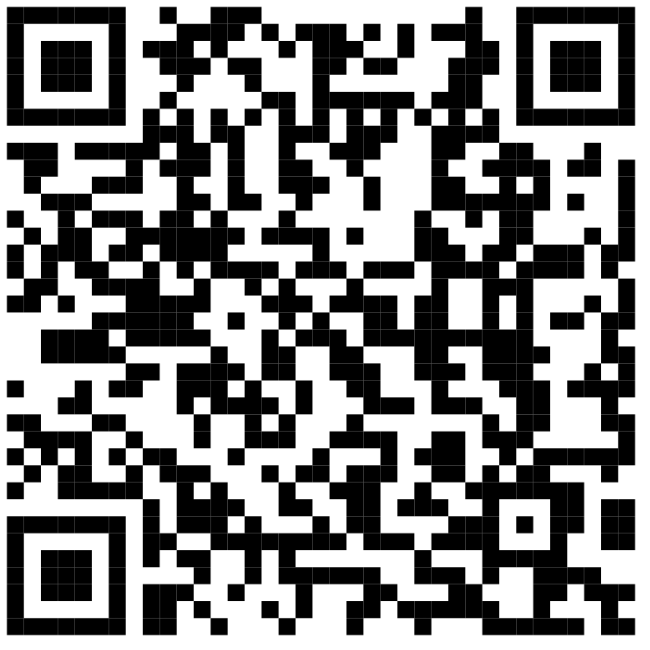
You can join the “WiscPRs” channel manually with default key “AQ==”. (Note exact caps.) WiscPRs is a ’bot gateway that feeds Wisconsin press-releases 8:00a to 8:00p, generating several bursts per day.
Such commercial content cannot in general be useful, but these PRs generate Mesh traffic where otherwise there would be none, and they may tell how the wind was blowing before communications crash.
Obviously this channel won’t do you any good unless you are local to Ἀργώ. Send “?help” to the channel for any further information that may be available.
There is one other kind of encryption supported by Meshtastic messaging — direct messages. Every radio has an asymmetric public/private key (password) pair. When you send a message directly to another radio, your radio encrypts the message with your private key and the recipient’s public key, which the recipient can read by decrypting it with his private key and your public key.
To send a message to one other radio, poke “Nodes,” which lives in the icon bar at the bottom of all the Meshtastic cellphone App’s screens. Select the target radio. (Please be aware that not all radios are set to receive messages.) Poke the “Direct Message” button (if there is one). You may then compose a message in the edit box at the bottom of the node’s screen and send it as you would for every other Szociál Media service under the sun.
I’ve included this section to assuage my own concerns that I’m not thinking about the Mesh correctly.
I’m tempted to see the results of TraceRoutes as nodes strung on an an outbound string followed by nodes strung in reverse order on an inbound string. Thus I see the outbound path that a message takes through the multi-connected mesh followed by the inbound path the acknowledgment takes as two series, which is correct so far as that concept goes. Unfortunately for me the two series are rarely the same, and I can’t make that concept explain why. Evidently mine is the wrong concept.
The Mesh is the Mesh. It’s not a directed graph. It is a pulsating vibrating network of local nodes all talking. When a node receives a message, it doesn’t rebroadcast it right away. It waits to see whether another node will rebroadcast it first. The wait time is random enough that rebroadcasts from two nodes will rarely collide. If a node hears another node broadcasting the same message, it swallows the message instead of rebroadcasting it. What is counterintuitive is that the wait time is biased so that messages with weak signals are rebroadcast sooner without waiting as much time as with messages with strong signals. Thus nodes at the edges of the universe are likely to get a crack at rebroadcasting before more central nodes do. This means that messages propagate outward through the universe and do not suffer a lot of interference from strong reflections nearby. Also it means that — in a sparsely populated region — there may be black holes a message does not reach.
Any TraceRoutes and acknowledgements, coming the other way, are not constrained to follow the same path and are just as likely to get lost in a black hole.
It won’t do to think of messages following a point-to-point path though the Mesh. They don’t. You and I will just have to stop believing that they will.
Instead the whole local mesh centered on the sending node participates. If the receiving node is in that set, then the message is delivered. The whole local mesh also participates in receiving TraceRoutes and acknowledgements, too. What is not obvious is that it is a different local mesh centered on the receiving node. If the sending node is in that set, then the TraceRoute or acknowledgement comes full circle.
The outbound nodes that actually handle the message and their signal strengths are known. Likewise the inbound nodes that actually handle the TraceRoute or acknowledgement and their signal strengths are known. It’s tempting to think of the outbound and inbound node sets as lists and to suppose that these nodes are chosen because the have strong signals, when the opposite is true. The nodes likely to participate are in fact weaker. The path a message takes is chosen in part randomly so inbound and outbound paths are likely to differ. Also, consecutive messages seldom use the same paths.
This wraps up the novice’s introduction to practical use of Meshtastic in (nearly) all its manifestations. You will of course wish to use it to hobnob with local Mesh neighbors, but you can do that on the Internet, too, in many larger urban areas.
You ought to be aware that you’re in a select group now because you’ve joined the rarefied ranks of Hobbyists, Preppers, and Makers who live next door to the ham-radio Operators and the Vigilantes. Go easy on them. They’re not the Anarchists you’re familiar with from Szociál Media.
The Vigilantes’ ethos is, “See no evil 🙈, hear no evil 🙉, speak no evil 🙊,” and they think you shouldn’t either, so overtly political topics are shunned. It’s really difficult to start a conversation about anything on the Mesh (unless you’re prepared to discuss hardware of course).
Keep in mind that the Mesh is a scarce resource. It exists because governments worldwide sanction it for off-grid communications. It must not be abused, or else governments may un-sanction it.
To novices it may seem that the Mesh is an empty echo chamber. I think the reasons are obvious. The Mesh is a low-traffic information band, and even those who maintain Mesh radios shunt aside messages just as they do spam eMails because they don’t consider the content valuable. It’s a fact that few people maintain Mesh radios, and even fewer are listening to them all the time — let alone getting up the gumption to respond.
The elephant in the room is that — in a sparsely populated region — the Mesh is unreliable. Ongoing tests performed in Sheboygan indicate that only about 2/3 of messages can be counted on actually to arrive, so there’s that. It’s possible no one even heard you. The obvious remedy is to recruit more nodes.
On a good day, transmission reliability is much better but still apparently much less than certain. Perhaps in an emergency when factories are shut down, other economic activity and vehicular traffic ceases, and all electronic devices are quiet, we will discover that the Mesh is stronger than ever because it was suffering from electrical interference all along.
But remember: Virtue is its own reward. Just keeping your radio charged and powered up contributes valuable bandwidth that ought to be appreciated whether or not it’s ever put to good use or acknowledged out loud.
